What is Morph?
In the game NosTale, a "Morph" (from the word morphing, meaning transformation) is a process in which the player's character dynamically changes form upon equipping and activating a Specialist Card.
From a technical perspective, a Morph is represented by a unique numerical value (known as a Morph ID), which is calculated by the server and differs from the ID of the item itself located in the inventory. When a player activates a card, the server transmits this new value in network packets to the game client.
As a result, the game engine receives an instruction to replace the hero's standard appearance. This change involves loading a new character sprite and updating the portrait icon visible in the top-left corner of the interface. Along with this visual transformation, the character also gains powerful stat boosts and an entirely new set of combat skills assigned to that specific class.
| Morph | Description |
|---|---|
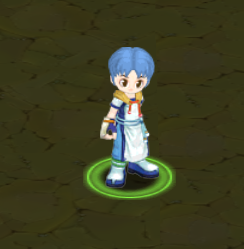 $morph 0 | By default you are using Morph 0. That will load sprite based on you class |
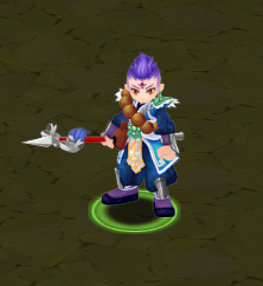 $morph 20 | When you equip a Specialist Card your Morph is changed |
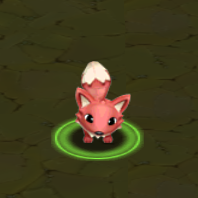 $morph 1001 | That can be used to change your appearance to Monsters too. |
How to change Morph?
OpenNos command
In OpenNos based servers you can change Morph by using the $morph <morph_id> command.
Packetlogger packet
You can also send to yourself c_mode packet.
c_mode 1 <character_id> <morph_id> 0 0 0 100 0
c_mode 1 42067 16 0 0 0 100 0
How Icon IDs work

Icon IDs for the portrait (top-left corner) are derived from item VisualChangeId and class. The 6th value in the item's INDEX row in Item.dat is the VisualChangeId value used in these formulas. (See Item.dat for more information.)
Specialist Card (SP) icon — character
- Male:
32500 + (VisualChangeId - 1) * 2 - Female:
32500 + (VisualChangeId - 1) * 2 + 1
Pirate Specialist Card (Vnum: 4099)
	VNUM	4099	0
...
	INDEX	4	4	0	12	915	16
...
6th value in INDEX is VisualChangeId = 16. Icon IDs: male = 32528, female = 32529.
Class icon (no SP equipped)
- Male:
32000 + classId * 40 - Female:
32000 + classId * 40 + 20
| classId | Class Name | Male Icon | Female Icon |
|---|---|---|---|
| 0 | Adventurer | ||
| 1 | Swordsman | ||
| 2 | Archer | ||
| 3 | Mage | ||
| 4 | Martial Artist |
Partner Specialist Card icon
25000 + VisualChangeId
Monster icon
Monster icon is calculated differently. See monster.dat (iconId section).
Code snippets
function getClassIconId(classId: number, gender: "male" | "female") {
  return 32000 + classId * 40 + (gender === "female" ? 20 : 0);
}

function getSpIconId(item: Item, gender: "male" | "female") {
  return (item.design - 1) * 2 + 32500 + (gender === "female" ? 1 : 0);
}

function getPartnerSpIconId(item: Item) {
  return item.design + 25000;
}